John Cerpnjak
  • About
  • Journal
  • Portfolio
  • Contact Me
  • Call Me
  • Menu Menu

Tag Archive for: career skills

AIDA Copywriting: Definition, Examples, and Strategies

career skills, copywriting

I first came across AIDA in copywriting college. It’s an acronym that stands for attention, interest, desire and action, which are the fundamental components of a direct response sales letter.

The assignment was to write sales letters asking for charity donations using AIDA.

Since then I’ve been using AIDA throughout my career. It’s so versatile I’ve been able to apply it to social media posts, online ads, landings pages, even content writing etc.

I’m going to take some time and share with you how best to use AIDA. I’ve collected some real life examples and use-cases to help me explain.

Table of contents  

The AIDA Principle Defined
Attention
Interest
Desire
Action
Your Next Step to Using AIDA in Your Copywriting

The AIDA Principle Defined

AIDA stands for attention, interest, desire, and action.

The goal of the AIDA in marketing is to do the following:

  • Grab the attention of readers and hook them like a fish.
  • Create a point of interest for them to continue reading.
  • Display a benefit which creates desire.
  • Finish it with a call to action.

Simple and straightforward, right? Not quite.

There’s many copywriting formulas out there. But AIDA takes some time to develop.

AIDA can be used in many different ways. You can use the whole principle in a single headline, or throughout an entire sales letter or blog post. So it takes time to truly master.

The best approach is to understand the 4 fundamentals of this technique and then mix it into your own copywriting in creative ways.

This brings me to the first part of AIDA in copywriting…

Attention

Attention is probably the most underrated currency in business.

If nobody sees your content, if nobody reads your copy, they won’t know you exist.

And it’s hard to make money if no one knows who you are.

That’s why hooking the reader in is the first step to using AIDA.

There’s different approaches to getting people’s attention. The first of which is by creating a great headline. Remember that approximately 80% of people read only the headlines.

Effective headline copywriting strategies include:

  • Use urgency: Urgency implies that the reader needs to take action or they will miss out on something worthwhile. It has the potential to improve the click-through rate and readership because of that. “5 Insanely Good Marketing Trends You Aren’t Using” is an example of a headline that includes urgency.
  • Make it ultra-specific: Vague headlines are boring and will put readers to sleep. Be as specific as possible to excite them to read your content. Think “How to DO SEO in 2020” versus “How to do SEO Like The Pros in 5 Easy Steps”.
  • Cite specific numbers: This plays off the last strategy because numbers make headlines much more interesting. Imagine an article titled “How I Made a Living From Writing” versus “How I Made $96,388 This Year From UX Writing”. The latter is much sexier.
  • Define the audience: Who are you writing for? Speak directly to this segment in the headline by mentioning them. An example of this would be “4 Tips For CMO’s to Scale Campaigns”.
  • Add emotional words: The purchasing process and other things in business are mostly emotional. You can attune to this and get people’s attention by leveraging emotionally charged words and phrases.

I love Vice magazine and their YouTube channel, so I wanted to include them as an example.

Take a good look at their headlines:

Vice headlines

Do you see that? They’re amazing at grabbing attention.

I don’t know or care about “The Creator of the Shitty Media Men List” but now I’m intrigued!

Better yet, AIDA can be applied to the introduction of your copy.

Look how legendary writer Gary Halbert gets your attention in the opening line of this sales letter he wrote:

Gary Halbert letter about mailing

By promising that his idea is worth thousands of thousands of dollars and many people are using it, the reader’s eyes become glued.

You can create attention within the beginning of an article or any other form of content by:

  • Asking a question the reader will find relatable.
  • Citing an interesting statistic or piece of data that relates to the topic.
  • Using a case study that proves your point.
  • Making a bold statement.
  • Addressing the reader right away by using words like “You”.

Once you’ve successfully done this, it’s time to generate interest.

Interest

Attention, interest, desire. What’s the difference?

Not much, actually.

That’s why writing with AIDA takes so long to master. You need to carefully craft your words.

Otherwise you end up making a mess of your thoughts.

Attention hooks the reader in. It’s bold. It gets them clicking through and wanting more.

Interest, on the other hand, is much more subtle.

You can achieve interest by first formatting your content properly. That means short sentences and paragraphs, speaking in the customer’s language, establishing a friendly voice, and creating a logical order of points.

This prevents readers from becoming confused or disinterested, helping them to flow through reading like water in a river.

Here’s an example of a Moz article that’s formatted to keep interest piqued:

Moz formatting example

There’s plenty of white space, images are easy to view, and the typography is formatted to make reading effortless.

Think of it like the RPMs on a car’s dash. One a customer is revved up, you want to keep it there.

Secondly, elaborating on what originally generated the reader’s attention is very important for helping interest continue to bubble.

Let’s say that you write an article on search engine marketing trends.

After hooking the reader through the headline and intro, you then cultivate interest by doing some of the following things:

  • Citing a case study that shows a company using one of the trends you’ve covered and the ROI it had. This solidifies your point while proving what you’re talking about has true potential.
  • You add an exciting statistic about search engines that backs up your point and gives the reader food for thought.
  • Source a graph or chart that has relevant data to the topic.
  • Tell a personal story related to how you found these trends or used them yourself to achieve success.

Once you have done this, it’s time for next step.

Desire

Readers and customers are selfish.

They are very “me, me, me” types of people.

In fact, we all are at times.

Imagine the last time you were shopping online. You probably ran different keyword searches looking for some product knowledge. Then looking into pricing, the best deals, discount codes, and generally scoured the internet to find out what you wanted.

But, have you ever gotten irritated that after all that time searching you still feel like you haven’t found the right ‘thing’ yet.

Me, too. It’s also why desire is a critical component to the copywriting formula I’m teaching you today.

This is because everyone wants to know what’s in it for them.

After creating attention and interest, it’s now time to talk about the benefits of your product, service, blog post, etc.

Here’s another sales letter that nails the concept of creating desire beautifully:

Gary Halbert sales letter on copy

The letter is offering readers a report that will teach them the secrets of writing great copy.

The fourth paragraph talks about how the report will reveal strategies for writing better copy and Gary Halbert’s “secret copywriting weapons”.

Think about what your readers or customers truly want. Perhaps it’s a primal desire they aren’t aware of themselves or something more obvious.

Either way, focus on that aspect at this point in your copy and it will get them jumping out of their seat for more.

Action

They’ve made it all this way.

The reader loved your headline, the introduction got them interested more, and you’ve cooked up a large amount of desire.

Now it’s time to help them take action.

Whether you’re producing a landing page, SEO article, or anything in between, there needs to be a call to action at some point.

This can be for purchasing a product, scheduling a demo, offering a lead magnet, or whatever makes sense for your individual campaign.

You can achieve any of these things using a clear call to action. A.K.A a statement that tells the reader what to do next.

Look how Ann Handley, a writer I look up to, has a CTA at the end of her blog posts for a newsletter:

Ann Handley CTA

This helps her generate more email subscribers that she can use to drive traffic to her blog or other offers.

Another good example is the AI company Morphio who educates readers on advanced marketing topics then proposes users to demo their automation platform:

Morphio AI cta

Why have readers go through an entire piece of content without it leading anywhere?

Always think of how you can add a smart call to action to your copy or other material, as well.

What I mean by smart is that it directly relates to the topic and isn’t a generic statement.

Looking back at the Morphio example, their article was titled “Google Analytics vs Hotjar”. They then state their software has Google Analytics integration if readers want to see how it works first-hand.

That’s clever.

Your Next Step to Using AIDA in Your Copywriting

There are millions of copywriting formulas you can use but AIDA takes the cake.

It’s heavily customizable and spices up any copy when you use it correctly.

The first step is to grab the attention of readers through powerful headlines and introductions. This is done by creating urgency, making bold statements, or addressing the reader personally.

Keeping their interest high can be achieved through presenting data, interesting statistics, and making your copy easy to read via proper formatting.

Desire is generated by explaining what’s in it for them. Talk up the benefits about your product or the information you’re presenting.

Then, don’t forget to end it with a clear call to action. This should move them closer to the sale or your campaign’s main goal.

Reach out to me for copywriting services if you need a hand.

How do you plan to use the AIDA copywriting formula now that you know the ins and outs?

0 Comments
https://cerpnjakjohn.com/wp-content/uploads/2017/06/JohnCerpnjakLogo.png 0 0 John Cerpnjak https://cerpnjakjohn.com/wp-content/uploads/2017/06/JohnCerpnjakLogo.png John Cerpnjak2021-04-21 00:33:472022-02-27 18:49:35AIDA Copywriting: Definition, Examples, and Strategies

If You Can Be Self-Employed, You Should!

freelancing

self-employedI want to share with you my first business breakthrough when I became self-employed.

There’s an accountant I work with who often says

“it’s not about how much you make that matters, but how much you keep”.

When I was younger I didn’t really understand what this meant. I mean, yeah, it sounds intelligent, but I figured “keeping” money was just another way of saying “spend less”.

However, after the first year I started working as a self-employed freelance digital marketer and was doing my personal tax returns, I realized that this advice was really about finding ways to reduce your taxable income.

Of course I’m talking about reducing your taxes by law abiding means and not being a crook.

The last job I had before going off on my own was working for a telecom company making a $50,000 salary.

So, when I did go off on my own, my goal was to match that and make $50,000 in the first year.

In my mind, I figured if I could make $50,000 on my own, essentially unemployed (cause you know, I wasn’t on anybody’s payroll), that it would be a great life experience. A fate far better than still sitting inside a cubicle office any longer.

And I thought even in a worse case scenario where somehow I totally screw up and lose all my money, I’d still have the experience of knowing how to make $50,000 all on my own. And nobody could ever take that experience away from me. Even if I lost it all, I’d know how to make it back because I have the experience of no longer relying solely on employment income.

So there I went off on my merry way, making strategic professional relationships, finding my own clients, doing work I’m proud of and eventually invoicing those clients and getting paid.

Inevitably I climbed past the $30,000 mark, registered my business name with the CRA (Canada Revenue Agency) and started adding HST tax to my invoices. I kept going and managed to reach that goal of $50,000 by year’s end.

Now here’s the cool part with the business breakthrough…

Everyone knows that whatever your annual salary is, you always take home less because of taxes and deductions on each of your pay cheques.

Here’s a snapshot look at what you lose if you make $50,000 a year working in the province of Ontario.

50000 salaryYou lose about $11,500, which is almost 25% of your earnings. It totally sucks, I know. But that’s the life of an employee.

However, when you’re self-employed things work a bit differently. You see, you can reduce your taxable income amount by claiming business expenses.

This is how it works, when you charge HST tax on your invoices you’re suppose to keep that money to the side and pay it to the CRA (the government). You can choose to make these HST payments annually, quarterly, monthly and I think you can even choose to pay bi-weekly. In my first year I paid it all annually at the end. Since then I’ve been doing it quarterly.

Here’s the cool thing with being self-employed, you can reduce the amount of HST tax you owe by offsetting it from the HST tax you pay on your business expenses.

So anytime you buy office supplies, computer upgrades or software, automobile expenses and gas, your phone and internet bill etc. all these things can be claimed as a business expense.

To figure out what you owe the government in taxes, you take all the HST you’ve collected from your invoices (in other words your income) and subtract it from all the HST you spent on your business expenses.

Chances are very likely that you’ll owe less taxes than someone who works as an employee.

So, what did I owe the government in taxes for that first year I was self-employed? Let me show you!

taxable income

That’s a photo of the letter my accountant wrote for me on the front page summary report of my personal income tax return for the 2016 fiscal year. I legally only owed the government $3,564.43 in taxes.

If you ask me, that’s a much sweeter deal than being an employee.

However, there are 2 caveats with this.

  1. The government forces everyone to make a CPP (Canada Pension Plan) contribution of 10% of your income. When you’re an employee you pay 5% and your employer matches the other 5%. When you’re self-employed, in the eyes of the CRA, you are both employee and employer of your own business, so they make you pay the full 10% on your own. But you don’t have to pay EI (employment insurance) deductions when you’re self-employed.
  2. Because it was the first time I had to manage all my income and expenses on my own, my accountant told me I was lousy at bookkeeping and I should have been better at keeping all my receipts. My accountant told me I could have paid even less tax if I was better at keeping track of all my expenses. (Fuck me, I guess).

So you better believe I went out and bought Freshbooks Cloud Accounting to help me with that! And guess what, my accounting software is a business expense so now I can deduct that too!

When it comes down to it, when you’re an employee making $50,000, you’ll pay roughly $11,583.60 in taxes and deductions. Compare that to the $8,564.43 (combining the HST I owed plus 10% CPP) I had to pay as a self-employed individual who made $50,000.

You can clearly see that I walked away at the end of the year with more money being self-employed. And that was my biggest business breakthrough in the first year. Now, it’s only a difference of about $3,000 and you might be thinking that’s not much. But think about all the cool stuff I can do with that extra $3,000. I can reinvest it back into my business, or put it towards retirement savings, hell, an extra $3,000 is even a good chunk of money for a vacation!

Now that I’ve learned this, I don’t think I’d go back to working for someone else as an employee. I’ve also been reading and educating myself more about small business taxation and how money works. It turns out that the small business tax rate in Canada is 15%. Compare that to the 100% tax you have to pay on every dollar you earn as an employee.

Although I haven’t incorporated my business yet to get that small business tax rate, it is my next goal to achieve. As well as continuing to increase my annual income well pass $50,000.

It does seem however, that the more I learn, the more I realize being an employee is the worst career choice you can make from a financial stand point.

Now, being an employee isn’t terrible. I started out as an employee, as do most other people. It’s a great way to get into the labour market and to get on-the-job experience in your field. But remaining an employee for the entirety of your career, well, that’s probably not the best choice you could be making for yourself (or your family). Although, every individual is different and I don’t want to come across as someone with a self-employed bias…

…but if you were to ask me what’s the moral of this story?

Simple: if you can be self-employed, you should!

0 Comments
https://i0.wp.com/cerpnjakjohn.com/wp-content/uploads/2017/08/Self-Employed.jpg?fit=1000%2C750&ssl=1 750 1000 John Cerpnjak https://cerpnjakjohn.com/wp-content/uploads/2017/06/JohnCerpnjakLogo.png John Cerpnjak2017-08-22 16:24:362017-08-22 20:23:59If You Can Be Self-Employed, You Should!

Pairing Typography like Wine

typography

pairing-typography

Pairing typography is a lot like wine tasting: making educated and inspired choices where the history, personality and unique details of each flavour bring out the best of its complement, creating an experience worth savouring.

Here are 3 quick steps to help give you some things to think about when pairing typography.

Step 1: Consider Classifications.

Know your classifications when it comes to pairing typefaces. Take the time to study things like humanist, grotesque and geometric type classifications. The generic pairing is typically a serif and sans serif. More unique pairs will come by mixing typefaces from two different classifications. Try not to pair two within the same class.

Typography Classifications

Source: lisagarnerdesign.co.uk

Step 2: Blend Characteristics.

Compare the x-height and character width of both of the typefaces. If they are relatively close, they will be a good fit, and easier to use next to one another for hierarchy and in running copy.

x height typography

Step 3: Find the Balance in the Details.

Seek similarities in anatomy and stress, achieving harmony with character details make all the difference. If one typeface has more character, then let the second one take a backseat and be a bit more generic.

Take a look at how I’m pairing typography on my own website. As of right now, (things may change at a later date) I’m using Futura for my headings and Helvetica for my body copy. Futura is a geometric sans serif, while Helvetica is a humanist san serif. For my <h1> tags I’m using the Futura extra bold weight, whereas for my <h2> tags I’m using the medium condensed weight. Both the extra bold and condensed weights have character that contrasts and balances well with the regular Helvetica I’m using for body copy.

Follow these three steps and you should be able to narrow down possible fonts that work beautifully and taste well together.

Check out TypeEd for more great learning resources on typography. It’s where I go.

Keep on typesetting deliciously!

0 Comments
https://i0.wp.com/cerpnjakjohn.com/wp-content/uploads/2017/06/WineBottlePairingTyoe.jpg?fit=800%2C600&ssl=1 600 800 John Cerpnjak https://cerpnjakjohn.com/wp-content/uploads/2017/06/JohnCerpnjakLogo.png John Cerpnjak2017-06-03 20:05:252017-08-23 14:55:32Pairing Typography like Wine

10 Marketing Skills to Future-Proof Your Career

career skills

It’s a crazy time to be a marketer. The shift from traditional channels to digital ones has been immense and it means marketing skills are always changing. Digital strategies and tactics have become so ubiquitous that there really is no difference from a “digital marketer” and a regular ol’ “marketer”. It’s pretty much all the same thing now.

Kinda like how responsive web design was all the rage a few years back. But now, making responsive websites that properly display for desktop and mobile devices is considered the norm. Whenever a website is created it’s just expected that it’s responsive.

Similarly, today’s marketers are expected to have a diverse set of skills, who can play various roles on a team, and know how to execute anything digital. From writing content and understanding data to demonstrating UX/UI design and actually knowing how to increase profits with audience segmentation and automation software, it’s all a part of the modern marketer’s arsenal.

And this expectation is justified. In 2017, spending on digital marketing is projected to increase by 12% to 15% on average.

In order to stay relevant today and tomorrow (digital) marketers are going to need these 10 skills in order to prosper.

  1. Analytics

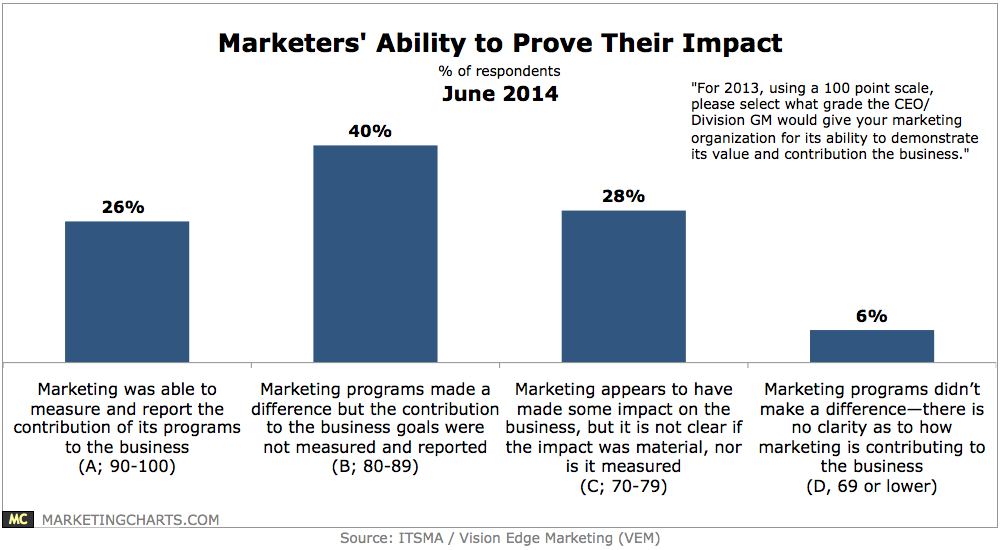
Wanna hear something crazy? Apparently, 84% of marketers have indicated that they cannot measure and report on the contribution of their campaigns for business owners.

That’s disappointing.

But at the same time that’s awesome. It means that for those who work our butts off it’s going to be easier to rise to the top.

There’s no way around it, business owners want to see a bottom line return on their marketing and advertising spend. Marketers need to become fluent in analytics to show relevant data and prove their worth.

Being able to measure ROI is in high demand. Companies want to know exactly what their getting for their money. Anyone who can continuously measure and optimize campaigns based on data will increase their chances of rising to higher positions within a company and making more money.

Creative minds aren’t enough anymore. You’ll have to develop an analytical mindset to stay on top of your game. Start number crunching!

  1. Writing and Communication

Content is still king. You know it. I know it.

74.2% of companies have declared content marketing has increased their marketing teams’ lead quality and quantity. Artificial intelligence and machine learning tools may be creeping into the workspace but nothing compares to a human telling a good story.

Marketers need to understand how to craft a content strategy around the buyer’s journey. It’s a significant role considering how content plays into educating, informing, inspiring, and motivating buyers and prospects, and as such, marketers need to understand how to create content that converts at each of these levels.

Marketers who can write and communicate well have an edge over employees that cannot. It’s just that simple.

Though writing and communication in themselves are basic skills, marketers should continually be improving their copywriting to communicate sales messaging in the most effective manner.

Those who can persuade buyers through writing or speaking will rise to the top of the pack.

  1. Marketing Automation

Marketing automation can significantly increase your campaign performance, and should be a required skill for any professional in the field. Learning how to use automated workflows that continually nurture leads through emails or content is not easy, but it works -research shows that marketing automation can drive up to 14.5% increases in sales productivity and 12.2% reduction in marketing overhead.

Practitioners can stand out if they learn how to create steady workflows for various prospect levels and understand how to analyze the corresponding data. Figuring out what works and what doesn’t is important with marketing automation, and those that can master this task will be ahead of the game.

So get out there are start building automation sequences in MailChimp or InfusionSoft for small businesses. If you want to work with enterprise clients learn Marketo and Salesforce’s Pardot.

  1. Research

Marketing campaigns begin with research, so honing this skill is important. For those who have been to university you’re probably already pretty good at this.

Marketers need to have a deep understanding of buyers, market trends, analytics, and opportunities in their field – this requires advanced research skills that go beyond a Google Search.

With research skills, the marketer should focus on improving the subject matter expertise of their business and gaining a better understanding of their buyer and market. Marketers that can research effectively—and quickly—are an added bonus to any team.

  1. Coding Skills

    Marketers who don’t know HTML and CSS are becoming washed up. I’d even argue that anyone who doesn’t have basic HTML skills probably won’t be employable in the future. It’s slowly becoming an expected skill for any office employee every coming year. However, learning the basics of both can help you quickly resolve any minor issues you may come across when managing a blog or website. Understanding how to modify a MailChimp email template or research a competitor’s website also require these skills. Again, these are becoming expected rather than desired skills.Encourage yourself to learn another language in how it relates to marketing. While they’re not expected to master Python, marketers can learn how to build a search engine crawler using Python to master SEO. Those types of additional coding skills are what employers will start to look for as HTML and CSS become the norm.

  2. User/Customer Experience

    While companies generally have a separate design team, marketers that understand basic design skills are in demand. Marketers already know a lot about the target market, so if they can work with the design team to help create a website experience that caters to that market, the site will most likely drive better engagement and results. 95% of customers agree that good user experience just makes sense, so why not pair up marketing and design teams to create a layout that’s appealing to the customer? Marketers should learn basic design skills in order to jump in and make a positive impact on customer experience.

  3. Inbound marketing

    Inbound leads cost 60% less than outbound, which means inbound marketing is a must-have skill.Using content, social, and SEO tactics, marketers must be able to bring potential customers to a website, but more importantly than that, marketers need to be able to bring the right customer to a website. Increasing traffic is possible by simply posting content throughout a bunch of Groups on a social media platform, but what marketers need be able to do effectively is bring qualified leads to a website. Use the right tools to bring real potential buyers to a site with specialized inbound marketing.HubSpot offers a free Inbound Marketing Certification course that’s got just what you need to get in on the ground floor.

  4. Understanding the Buyer

    Going along with inbound marketing, marketers must understand buyers and the buyer journey if they’re going to bring them to a website and eventually get to a sale.Marketers can learn and understand the buyer process by collaborating with the sales team. Once marketers know the buyer cycle, they can create specific content around each stage of that process.95% of buyers prefer brands that provide content throughout the buying process, which means the sales and marketing teams must align. Marketers that can create content to push potential buyers down the sales funnel to create sales are valuable — and can measure that value in dollars.

  5. Mobile

    There seems to be no slowing down in the growing use of smartphones for Internet users. I recently ran a Google Adwords campaign where 65% of all our paid traffic came from mobile! Marketers need to understand how to implement timely and location-based campaigns that target mobile users. With mobile optimization the norm, marketers can utilize other mobile tactics, such as text message offerings and location-based offers, to entice users to interact with a brand. Mobile is growing at a rapid rate. I’ve even noticed some companies in Toronto are hiring a separate mobile team. Marketers that can create mobile-specific messaging and drive engagement on smartphones will be well sought after in the near future.

  6. SEO

    Every year I come across headlines declaring that “SEO is dead,” but SEO never really dies, it just changes.Being able to get your brand or client to the first page of Google, or the #1 result, is the desired outcome. Users are less likely to click on page two of search results anymore. But is Google constantly updating itself and the way we search online changes. By keeping up with SEO trends you can stay ahead. Andrey Lipattsev, Search Quality Senior Strategist at Google, said that high quality content and link building are the two most important signals used by Google to rank your website for search. Marketers that produce high quality content and can effectively link build, while maintaining other SEO best practices, will always be in demand.

The Future Marketer

If you want to keep your skin in the game you’ll need to constantly learn new skills and adapt to online changes.

As online behavior and algorithms shift, so do marketing tactics – and therefore marketing best practices. When it comes down to it, it’s simple, marketers that thrive on change and continue to learn new techniques will always have employment. Those that don’t keep up will fall behind.

These are the 10 skills I think marketers need to ensure they have today to succeed. But I’ll be honest, I’m certain this list has to change going into the future. The very best marketers will be called upon to learn even more. Here in Canada, it’s never a bad idea to be bilingual. It only helps your employability. But I can definitely see a future from here where being multilingual would only help marketers serve more businesses globally. And as business owners want more numbers, marketers should strive to learn more in-depth data science such as data mining.

If you’re a marketer and you practice continually improving your skills, research abilities, and self-educate, you can stay at the top of your field.

0 Comments
https://cerpnjakjohn.com/wp-content/uploads/2017/06/JohnCerpnjakLogo.png 0 0 John Cerpnjak https://cerpnjakjohn.com/wp-content/uploads/2017/06/JohnCerpnjakLogo.png John Cerpnjak2017-05-21 03:51:562018-06-10 15:51:0510 Marketing Skills to Future-Proof Your Career

4 Skills You Need to Quit Your Job and Go at it Alone

career skills, entrepreneur, freelancing

Hello Planet Earth,

If you’re like most people, you’re probably content with your 9-5 job. Getting up in the morning, putting on some fresh office threads and getting through your drive time commute are all things you’ve probably grown familiar and comfortable with.

Your job performance is probably spot-on, whatever your duties may be, and you probably feel secure with your bi-weekly pay cheques. It’s probably a good life you live.

Or is it?

If you’re anything like me, you can probably remember a time back in grade 10 Careers class when the teacher asked you some pretty common questions like, “what do you want to do when you grow up?” or “what kind of hours do you want to work?” and the often asked, “what are you most passionate about?”

I remember all the students in the class being split into little groups where we’d huddle together and share some thoughts and ideas. Back then when I was 15, I remember a lot of the students fantasized about being ‘entrepreneurs’ or ‘freelancers’.

We didn’t really know what those words meant back then because most kids’ parents were the typical 9-5 corporate office workers.

But the allure of being your own boss peaked the interest of every 15 year old, even though none of us had mentors at the time to guide us towards any kind of self-made success.

I mean, what high school teacher would know anything about being self-employed… or any university/college professor for that matter?

I personally didn’t meet any entrepreneurs who would take me under their wing and show me the ropes of how to make a job for myself, instead of trying to find a job like everyone else.

I’m 26 now and have been working in my career for the last 3 years and at the end of last month I did something crazy…

… I quit my job working in the marketing department of a telecom company without any other job offers from another employer.

You see I didn’t need any other job prospects. Over the last 3 years, I spent my evenings and weekends doing various different types of copywriting and design freelance work for a handful of ongoing clients.

I got to a point where my freelance work was presenting more interesting opportunities for my career than my regular day job. Quitting my 9-5 to free up more time for the more interesting freelance work was a no-brainer.

So now I’m going to share with you the 4 skills I developed over the course of my career so far that’s allowed me to quit my corporate job and take on the world on my own terms!

Learn Copywriting

Let me start by saying this: when I was in university I realized that all the wealthy and successful people I knew, the people making 6-figures or more, were all terrific communicators. Whether it was with writing or speaking, they could all communicate clear and concise thoughts and ideas. The kind of ideas that are worth being sold and ultimately worth good money in return.

Copywriting is the craft of writing persuasively with the intention to sell. Because of that little insight I realized in university, I went on to study Advertising Copywriting in a 1-year post-grad college program.

You don’t have to go to school to get an education in copywriting, but I firmly believe having copywriting as one of your skill sets to be an invaluable tool. The better you can write, the more money you’ll be able to make.

There are some great resources online if you wanna improve your copywriting skills. Copyblogger has a membership site, it’s free to sign up, and you’ll find a ton of great informational resources from them. Everything from articles about headline writing, email subject lines, to how-to guides for writing you own books and reports.

With strong writing and communication skills, it’ll help improve and amplify the other skills listed below.

Learn Design

Once you’ve got a piece of writing put together the next thing you’d need to figure out is how you’re going to layout your copy on a print document, webpage, banner sign etc.

You don’t need to be an award-winning designer to get work for yourself.

Just having a solid foundational understanding of layout compositions, colour theory and typography are enough. If can use Photoshop, Illustrator and Indesign you’ll have the tools to solve any design problem.

Kuler can help you decide on colour swatches for your design projects.

TypeEd is a wicked resource for learning everything about typography. I recommend signing up to their email newsletter as they share different tips on typesetting and typographic design.

Learn Code

Learning computer programming languages was something I tried avoiding whenever I could when I was in university and it’s something I regret doing while growing up.

Since I started my career it’s become more and more clear to me how valuable learning to code is not only useful now, but will continue to be useful in the future.

Again, you don’t need to be a master at web development or programming, but a solid understanding of HTML and CSS will give you the ability to build websites, landing pages, and graphical emails. All of which are projects business owners will pay good money for.

Codeacedmey is a great place to learn how to write code online. It’s a membership site and when you create an account you can take their online courses for free.

HTML5up is another resource you can download free creative commons licensed website templates from.

If you’re going to be doing work on the web in this digital information age we now live in, it’s also a good idea to wrap your head around content management systems (CMS) like WordPress. Something like 25% of all websites on the internet are built on the WordPress platform.

WordPress runs on a PHP framework, so having even a beginners understanding of PHP can help you become more useful to prospective clients. There’s other langaues you can learn like JavaScript and JQuery, but you don’t really have too.

My own knowledge of PHP, JavaScript and JQuery are pretty limited but it hasn’t stopped me from creating work for myself.

Be a Cool Cat

What I mean by this is people have to like you. The clients you’re going to do work for need to trust you and have faith you can deliver on what you promise.

You need to adopt a style and tone of professionalism. This doesn’t mean you necessarily have to dress in suits, just don’t dress like a trucker.

You also need to pay attention to the way you speak. There is a lot of jargon when it comes to copywriting and design. Heck, some business people might not even know that when you’re using the word “copy” that you’re taking about the written words on an advertisement or web page!

It’s important to learn to speak to people in a way that they’ll be able to understand you.

Know this, if you’re talking to someone and they don’t understand the design or web development terminology you’re using, it’s not their fault for not knowing. It’s your fault for not communicating in a way that they can understand you simply.

Design is about taking complex ideas and communicating them in the most simple and effective manner possible. You need to embody this principle not only in your work, but in the way you interact with others.

I was having lunch with one of my clients the other week along the Toronto harbor front. We were just making small talk over some beer when he started to compliment the way I dress and the way I speak. He told me that I gave him the strong impression that I was a young professional who was hungry for success, and that he was happy he fired his last freelance contractor and found me instead. This particular client was a successful middle-aged real estate renovation specialist, so it was cool that he could see these things in me.

I’m not saying you should be fishing for compliments during your client meetings, but you need to understand that people will want to work with you for reasons beyond the actual sit-down-computer-work you do for them.

Quitting your job and working for yourself requires that you build and nurture your own professional contacts. People work with people they like, so if you can be a “cool cat”, people will see you as a subject matter expert and a trusted advisor.

There you have it! Those are the 4 skills I developed over the course of my school education and early career that helped me quit my 9-5 job and take on the world alone; copywriting, design, coding, and being a cool cat (professional communication skills).

Are you a freelancer or entrepreneur? What skills do you have that you believe are vital to your success? Leave a comment below and let me know what you think.

Until next time…

Keep rockin’ in the free world!


0 Comments
https://cerpnjakjohn.com/wp-content/uploads/2017/06/JohnCerpnjakLogo.png 0 0 John Cerpnjak https://cerpnjakjohn.com/wp-content/uploads/2017/06/JohnCerpnjakLogo.png John Cerpnjak2016-08-15 20:03:182016-08-24 00:26:404 Skills You Need to Quit Your Job and Go at it Alone

Join My List

Read These

  • AIDA Copywriting: Definition, Examples, and StrategiesApril 21, 2021 - 12:33 am
  • real estate lead generation websites
    After Making Real Estate Lead Generation Websites for Over a Year Here’s What I LearnedAugust 20, 2018 - 4:25 pm
  • seo pr strategy
    Stumbling into My Own SEO PR Strategy by AccidentJuly 31, 2018 - 6:46 pm
  • “Do We Need to Switch to a New SEO Plugin?”May 17, 2018 - 9:00 am
  • gradient background
    Gradient BackgroundFebruary 20, 2018 - 9:35 pm

Follow Me

Instagram

Follow Me!

What I can do for you

  • Copywriting Services
  • Performance Marketing Services

Explore

  • About
  • Contact
  • Journal
  • Portfolio

Contact

John Cerpnjak
Cerpnjak Consulting
50 Ordnance St

Toronto, ON M6K 0C9, Canada
905-330-9535
talk@cerpnjakjohn.com

© Copyright - John Cerpnjak
  • Link to X
  • Link to Facebook
  • Link to Instagram
  • Link to Youtube
  • Link to LinkedIn
  • Privacy Policy
  • Cookie Policy
Scroll to top Scroll to top Scroll to top
John Cerpnjak
Manage Your Consent

To create the best user experience possible, I use technologies like cookies to store or access your device's information. Consenting to these technologies allows me to get a sense of your browsing behaviour. Not consenting or withdrawing consent, may adversely affect certain features and functions of my site.

Functional Always active
The technical storage or access is strictly necessary for the legitimate purpose of enabling the use of a specific service explicitly requested by the subscriber or user, or for the sole purpose of carrying out the transmission of a communication over an electronic communications network.
Preferences
The technical storage or access is necessary for the legitimate purpose of storing preferences that are not requested by the subscriber or user.
Statistics
The technical storage or access that is used exclusively for statistical purposes. The technical storage or access that is used exclusively for anonymous statistical purposes. Without a subpoena, voluntary compliance on the part of your Internet Service Provider, or additional records from a third party, information stored or retrieved for this purpose alone cannot usually be used to identify you.
Marketing
The technical storage or access is required to create user profiles to send advertising, or to track the user on a website or across several websites for similar marketing purposes.
  • Manage options
  • Manage services
  • Manage {vendor_count} vendors
  • Read more about these purposes
View preferences
  • {title}
  • {title}
  • {title}

Loading Comments...